


David J. Danto
Travel thoughts in my
own, personal opinion
eMail: ddanto@IMCCA.org Follow Industry News: @NJDavidD on 

The Traveler’s
Toolbox – Update #10
 “What do
you have in this thing?” is what colleagues often ask me when they
attempt to lift up my flight carry-on bag (my “personal item” as it were.) Over the last few years I’ve published a
series of blogs ( 1,
2, 3, 4, 5, 6, 7, 8 and 9) that listed
a number of devices and tools that I keep with me when I travel. Things change rapidly in technology, and my
bag will always have a bunch of new items, so here is the latest update. Click the links in each section to see some
examples of where to get these cool travel tools.
“What do
you have in this thing?” is what colleagues often ask me when they
attempt to lift up my flight carry-on bag (my “personal item” as it were.) Over the last few years I’ve published a
series of blogs ( 1,
2, 3, 4, 5, 6, 7, 8 and 9) that listed
a number of devices and tools that I keep with me when I travel. Things change rapidly in technology, and my
bag will always have a bunch of new items, so here is the latest update. Click the links in each section to see some
examples of where to get these cool travel tools.
· A Mouse
That Fits in Your Pocket – The Logitech
Mobi Fold. Portable mice have always involved a
compromise. A normal mouse is too bulky to carry everywhere, while many
so-called travel mice are so small and flat that using one for more than a few
minutes feels like trying to operate a computer with a hotel-room bar of soap.
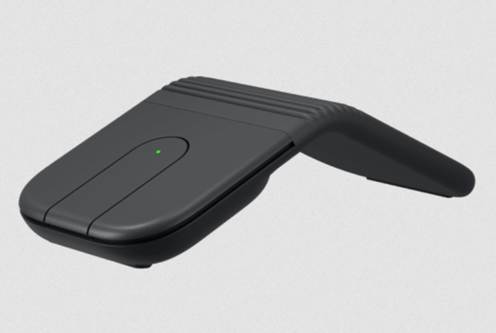 The Mobi Fold approaches the problem
differently. It is a real mouse that folds nearly in half when you are finished
using it. Folding it shuts it off and creates a compact package that fits
easily into a small pocket in a computer bag. Open it and it sort-of takes on
the curved shape of a more conventional mouse (The open shape is closer to a
tent than a curve, but it works just the same.) It weighs less than three
ounces and feels solid enough that I am not worried about the folding mechanism
coming apart after a few trips.
The Mobi Fold approaches the problem
differently. It is a real mouse that folds nearly in half when you are finished
using it. Folding it shuts it off and creates a compact package that fits
easily into a small pocket in a computer bag. Open it and it sort-of takes on
the curved shape of a more conventional mouse (The open shape is closer to a
tent than a curve, but it works just the same.) It weighs less than three
ounces and feels solid enough that I am not worried about the folding mechanism
coming apart after a few trips.
It can connect directly through Bluetooth or use Logitech’s included
Logi Bolt USB-C receiver. A button lets you move quickly between the two types
of connected devices, making it practical for someone carrying a laptop, tablet
and perhaps a second computer. Logitech says it can remember as many as three
devices. It is rechargeable, runs for about a month between charges and can
reportedly get approximately 22 hours of use from a one-minute emergency
charge. The traditional scroll wheel has been replaced by a touch-sensitive
strip that automatically moves between precise, line-by-line scrolling and
faster movement through a long page. Scrolling took a little getting used to.
I like the Mobi Fold about 90 percent. The missing 10 percent is all in
my right index finger. When my hand rests naturally on the mouse, my index
finger does not quite reach the portion of the left button where the click is
easiest to activate. My longer middle finger reaches the right button without
any trouble, but the left button requires me to stretch or move my hand forward
slightly. The front of the mouse needs to be raised, tapered or angled so the
active clicking area comes back toward the user.
That is irritating because nearly everything else about this mouse is
exactly perfect. It is compact without feeling like a toy, the touch scrolling
works, the battery lasts and the choice between direct Bluetooth and a USB-C
receiver makes it useful with almost anything. It has earned a place in my
travel bag, but Logitech is one small ergonomic adjustment away from having
something genuinely wonderful.
· A
Translator That Explains More Than Words – The Vasco
Translator Q1. Electronic translators are not
new. Smartphones can already translate spoken phrases, typed words, menus and
signs. The question is whether a separate device can do enough more than a
phone to justify carrying and charging another piece of hardware.
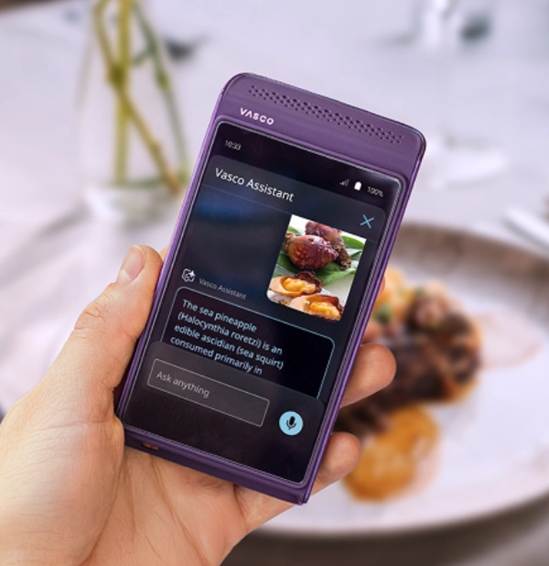 The Vasco Translator Q1 makes a surprisingly
strong argument that it can. It handles the expected voice, text and photo
translation functions, but its most interesting feature is something called
Vasco Assistant. Point the camera at a symbol, a street marking, a local food
or another unfamiliar object and it attempts to explain not only what you are
seeing, but what it means in that specific country or culture.
The Vasco Translator Q1 makes a surprisingly
strong argument that it can. It handles the expected voice, text and photo
translation functions, but its most interesting feature is something called
Vasco Assistant. Point the camera at a symbol, a street marking, a local food
or another unfamiliar object and it attempts to explain not only what you are
seeing, but what it means in that specific country or culture.
That distinction matters. Translating the name of a dish does not
necessarily tell you what is in it, how it is prepared or why it is important
locally. Translating the words on a parking sign may not explain the rules that
residents already understand. Vasco Assistant can provide context about
regional cuisine, customs, symbols and even local regulations. The Assistant
feature currently allows 100 requests, with the allowance refreshing every 30
days.
The other significant advantage is connectivity. The Q1 includes a
built-in SIM card and free lifetime cellular data for translations in nearly
200 countries. This is not a general-purpose hotspot that will let you stream
Netflix from the middle of Rome. It is connectivity solely for the Vasco
translation services. Still, it means you do not have to find Wi-Fi, purchase a
local SIM, activate an international data plan or worry that the translation
application will stop working just when you need it.
The Q1 is not inexpensive, but unlimited translation connectivity
changes the value calculation. For someone who travels internationally only
once every few years, a phone application may be enough. For a frequent
international traveler who regularly encounters unfamiliar languages, menus,
signs and local rules, the combination of translation, cultural explanation and
lifetime connectivity may justify the cost by itself.
· A Car
Mount That Grabs and Charges the Phone for You – The
Scosche MagicGrip Wireless Charging Mount. Most car
phone mounts require some combination of pushing, squeezing, clamping or
carefully lining up the phone before you can drive away. This one does nearly
all of that for you.
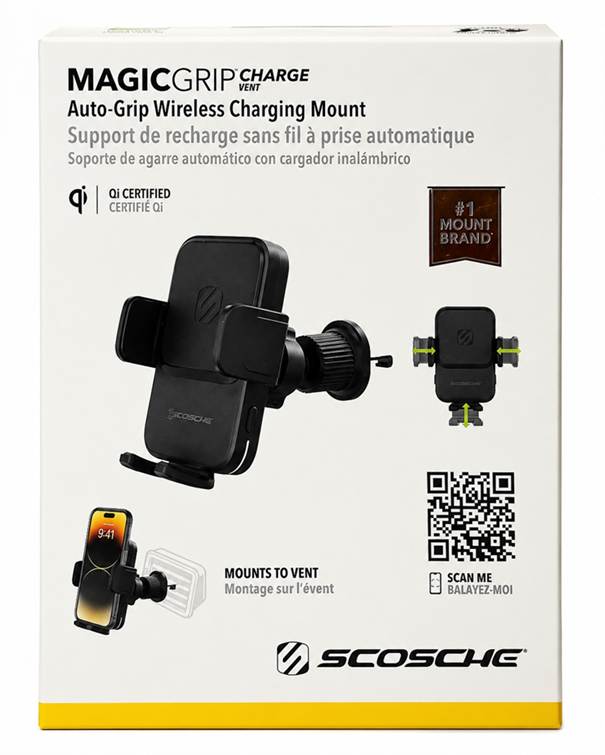 The MagicGrip VentCharge attaches to a
vehicle’s air vent and receives power through USB-C. It can plug directly into
a car’s USB port, or use the included cigarette-lighter adapter in an older
vehicle. Once powered, an indicator light confirms that the mount is ready.
The MagicGrip VentCharge attaches to a
vehicle’s air vent and receives power through USB-C. It can plug directly into
a car’s USB port, or use the included cigarette-lighter adapter in an older
vehicle. Once powered, an indicator light confirms that the mount is ready.
Place the phone against the charging surface and the mount automatically
senses that it is there. A small motor closes the side grips around the phone
and positions it correctly for wireless charging. There is no button to press
and nothing to squeeze manually. The phone simply touches the mount, the arms
close and charging begins.
What impressed me most is that it works with my iPhone 16 inside a
battery case. That makes the phone considerably thicker than a typical bare
phone or one in a conventional protective case, yet the mount still opens far
enough and grips it securely. That alone distinguishes it from many car mounts
that work perfectly in the product photographs but become useless as soon as a
thicker case is involved.
Removing the phone is just as mechanical. Press the release button and
the same motor opens the arms again. This is not a spring-loaded clamp that
snaps open or gradually loses tension. The mount actively opens and closes,
with the indicator light showing that it has power and is responding.
It is a clever combination of a vent mount, powered automatic grip and
wireless charger in one device. Each of those technologies is familiar on its
own, but bringing them together this smoothly makes the MagicGrip VentCharge
feel like much more than another piece of plastic clipped to a rental car’s
dashboard.
· Open-Ear
Audio for a Full Day of Calls – The Shokz OpenMeet2 UC. I have
used Shokz bone-conduction devices before, but the OpenMeet2 is a different
sort of product. It is a professional communications headset designed for
people who spend a significant part of the day on calls but do not want their
ears sealed with conventional headphones.
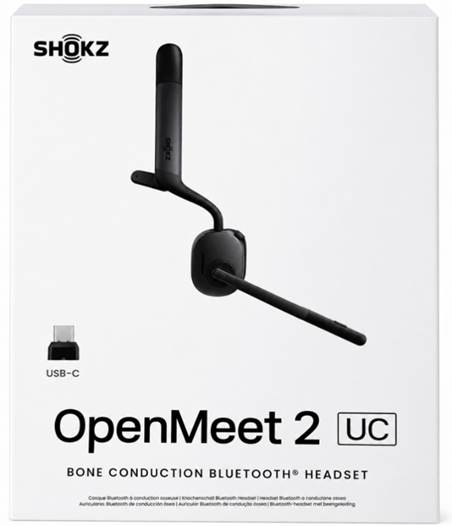 The OpenMeet2 is different from prior Shokz
(formerly AfterShokz) products that relied solely on bone-conduction to
propagate audio for the user. This
device uses Shokz DualPitch technology, which combines the bone-conduction
system with a separate air-conduction driver positioned near the ear. The
bone-conduction component handles much of the voice and higher-frequency
information, while the air driver adds the lower frequencies and fullness that
traditional bone-conduction headsets often lack. It is an unusual listening
experience because the sound is clearly present, yet your ear canals remain
completely open to hear if the doorbell is ringing or the baby is crying.
The OpenMeet2 is different from prior Shokz
(formerly AfterShokz) products that relied solely on bone-conduction to
propagate audio for the user. This
device uses Shokz DualPitch technology, which combines the bone-conduction
system with a separate air-conduction driver positioned near the ear. The
bone-conduction component handles much of the voice and higher-frequency
information, while the air driver adds the lower frequencies and fullness that
traditional bone-conduction headsets often lack. It is an unusual listening
experience because the sound is clearly present, yet your ear canals remain
completely open to hear if the doorbell is ringing or the baby is crying.
That open design can be useful in any location where you need to hear
both the call and what is happening around you. It also reduces the heat and
pressure that can make conventional headsets uncomfortable after several hours.
The entire headset weighs about 78 grams and is designed to work with
eyeglasses, earrings and hearing aids.
The OpenMeet2 has a boom microphone with AI-based noise reduction, a
rotary volume control, a dedicated mute button and the ability to mute by
raising the microphone boom. A built-in busy light lets others know when you
are on a call. Shokz rates it for as much as 12 hours of talk time or 16 hours
of listening, and a five-minute charge can provide roughly two additional hours
of talk time. The UC edition also happens to be certified for Zoom and Webex
with more platforms coming.
This is one of two new open-ear headsets in this installment of the
Traveler's Toolbox, with the new Cleer model below. The obvious trade-off is gaining awareness of
the sounds around you while losing the sound isolation that comes at varying
degrees from in-ear or over-ear devices.
· Open-Ear
Earbuds That Keep Getting Smarter – The Cleer ARC 5. I have
previously used and reviewed earlier products in Cleer’s ARC series, and each generation
has moved the open-ear concept a little further. The new ARC 5 continues that
progression, adding features that would have seemed excessive on a pair of
open-ear earbuds only a few years ago.
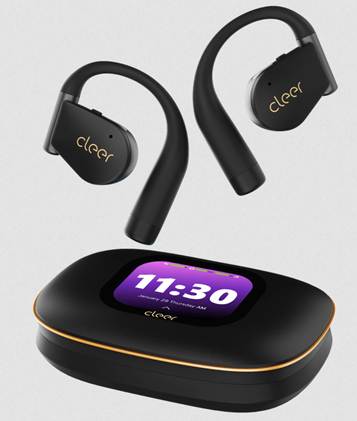 The basic concept remains familiar. Each unit
loops over the ear and positions its speaker just outside the ear canal.
Nothing is inserted into or seals the ear, so you can listen to music, podcasts
or a call while remaining aware of announcements, traffic and other people. That
awareness can be particularly valuable in any number of circumstances where you
want to remain 100% aware of what’s going on around you.
The basic concept remains familiar. Each unit
loops over the ear and positions its speaker just outside the ear canal.
Nothing is inserted into or seals the ear, so you can listen to music, podcasts
or a call while remaining aware of announcements, traffic and other people. That
awareness can be particularly valuable in any number of circumstances where you
want to remain 100% aware of what’s going on around you.
The ARC 5 adds THX Spatial Audio, Dolby Atmos optimization with head
tracking, Snapdragon Sound and support for high-resolution and lossless
Bluetooth formats. Cleer uses a 16.2mm driver in each earpiece and has made the
hooks thinner and lighter than those on earlier ARC products. Each earbud
weighs about 11.5 grams and carries an IPX7 water-resistance rating.
The charging case may be the most immediately noticeable change. It
contains an AMOLED touchscreen that can control playback, adjust the equalizer
and display information without requiring you to pull out your phone. I’ve
always been a big fan of touchscreens on charging cases, which allow much
easier adjustments of headsets than remembering a sequence of presses or
looking for a companion app.
Cleer rates the earbuds for as much as 12 hours of use on a charge and 60
hours when the case is included. A ten-minute quick charge can provide
approximately four hours of listening. The ARC 5 also supports Bluetooth
multipoint, which is important for anyone moving between a phone, tablet and
laptop.
I’m always on the lookout for
convenient or cool things to carry on my travels. If you spot something I
should feature in a future Traveler’s Toolbox, please drop me a note. I also
want to hear if you’ve had any issues with any of the items I’ve mentioned –
good or bad experiences help others. And to answer a question I’ve gotten from
a few manufacturers: no, I don’t earn any money or commissions from the links
or products I write about. The most I’ll ever accept is a sample to test
because I never recommend anything I haven’t personally tried. It’s just easier
to remember the truth than to keep track of a story that isn’t real.


After
decades of candid travel commentary – from loyalty program “magic tricks” to
hotel check-in roulette – I’ve decided to turn some of that honesty into
apparel. These aren’t novelty shirts;
they’re the exact truths every road warrior wishes they could say out
loud. Whether you’re quietly muttering “My
loyalty points devalued while you read this shirt” or admitting “If
delays build character then I’m the whole movie’s
cast” you’ll find plenty of familiar sentiments… and more. Everything is
produced by a reputable outfit, with black tees that work under a sport jacket
plus hoodies and wicking travel gear for life on the road. The site also has my
honest and snarky takes on technology trade shows. Take a look at Tinyurl.com/TechAndTravelWear. Even if you’re not buying
they’re fun to read and commiserate – and if you do buy something, maybe I’ll
break even. If you want a style you don’t
see, just email me and I’ll add it.
This article was written by David Danto and contains solely his own, personal
opinions.
All image and links provided above as reference under
prevailing fair use statutes.
Copyright 2026 David Danto
++++++++
As always, feel free to write and comment, question or
disagree. Hearing from the traveling
community is always a highlight for me.
Thanks!